TV and Screen Moving in the Eastern Province: How Your Large Screen Arrives Without Cracks, Lines or Dead Pixels
The screen is one of the most delicate items in a home: a thin glass or plastic panel carrying millions of light points, where a little finger pressure or a wrong carry can bring lines, dark patches or a crack that cannot be repaired. It is also among the most expensive things moved: a large television in the majlis, gaming or work monitors, and displays in offices and meeting rooms. In the Eastern Province, where big screens are common in majlis and living rooms, people always ask how to move a screen without damage. This page explains how screens are carried, wrapped and placed in the truck, how they are taken off the wall and mounted safely, what must never happen to them and how to check them after arrival.
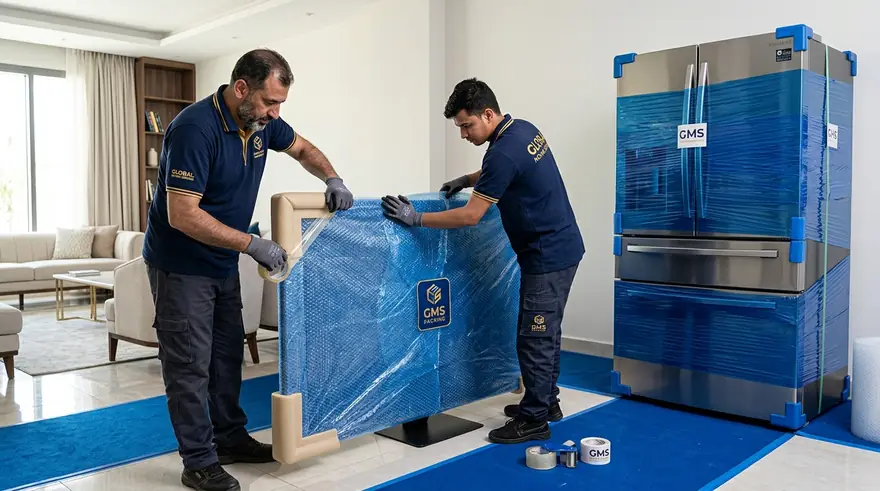
Why screens damage so easily
Modern screens are very thin: a front glass or plastic panel hiding layers of lighting, precise arrays and slender cables. The weakest part is not the front glass but the edges, corners and the electronic boards behind the panel. Pressure on the middle, leaning it at an angle on a wall, putting anything on top or carrying it by loose edges often causes damage that only shows once switched on.
So the aim of the move is one: the screen must take no direct pressure on its surface, must not travel lying down and must not shift in the truck. That is what we explain here with steps and reasons, by screen size and type.
Screen types and what changes in moving them
Principles are similar and the details differ.
| Type | What defines it | What deserves attention |
|---|---|---|
| Large majlis TV | Weight and size needing two people or more | Edges, the stand and wall mounting |
| Medium bedroom TV | Lighter and easier to carry | The original box and the stand kept separate |
| Computer or gaming monitor | Sensitive with a detachable stand | Stand, cables and edges |
| Office or meeting-room screen | Often many with fixed mounts | Numbering and moving them with workstations |
| Display or interactive board | Heavy and wall-mounted | A technician to remove and fit, and measuring dimensions |
When requesting, state the screen size in inches, its type and whether it is wall-mounted or on a stand.
Six steps to move a screen safely
These apply to most types.
Switch off, unplug and wait
Turn the screen off and disconnect cables once it has cooled a little, and photograph the rear connections to ease reconnection.
Gather accessories
Remote, cables, adapters and the table stand go in a bag taped to the screen or with its box.
Remove the stand or mount
From the wall or base; heavy mounts are better handled by a specialist, and screws and wall fixings are kept in a bag.
Wrap it
A soft film over the surface, then bubble wrap, then rigid cardboard or the original box with its inserts.
Keep it upright and secured
Moved vertically between supporting layers and strapped so that nothing presses on its face.
Write screen, fragile, upright
On the entire carton, so nothing is put on it or it is turned over.
The original box: the best protection and what to use instead
The screens original carton with its foam inserts was designed for that exact model, protecting edges, holding the screen still and preventing pressure. If you kept it, that is the best option. Place the screen in it in the same position it came in and add nothing inside. Before closing, check the inserts are intact.
If you do not have the carton, the suitable substitute is a purpose-made screen carton bought to size, or layered wrapping: a soft film, thick bubble wrap, then rigid cardboard panels on front and back. A single layer of plastic or a blanket is not enough, as neither prevents pressure on the face.
Six mistakes that damage screens
These mistakes recur more than any others.
Carrying it lying flat
Lying down exposes the panel to pressure and bending, and internal breakage happens with no visible mark.
Lifting from the middle
A screen is lifted by its solid edges or by its carton, never from the middle of its face.
Putting anything on top
Even a light carton can press on its surface on a bumpy road.
Leaning it at an angle on the truck wall
It can slide and take pressure on a single edge.
Sticking clear wrap directly on the face
It can leave marks or trap moisture; a suitable soft film is better.
Switching it on straight after arrival
Moisture may have condensed on its boards; wait a while, then connect and test.
Taking a screen off the wall and mounting it: when do you need a technician?
A small screen on a table stand is easy to take apart, but a large wall-mounted one needs care: part of it is lifted from the top of the bracket and lowered, and it needs at least two people because of its weight. If it is connected to cables hidden in the wall or to a moving arm mount, a specialist technician is better, who disconnects wiring and protects the cables.
Mounting a screen on the new wall requires deciding the height and brackets suitable for the wall type, concrete or plasterboard, and hidden wiring if you want it. To confirm whether a technical arrangement for removing and fitting wall mounts is available for your request, contact us; we do not promise it before confirming.
Placing screens in the truck and securing them
Screens are loaded after the heavy furniture and before the light, set upright on their long edge, against the truck wall or a padded partition, with a blanket layer between them and furniture. They are strapped with bands that do not press on the face, and nothing is put on them even if light.
On long routes between cities in the province, vibration has more effect, so screens go in the most stable part of the truck away from the door and are wrapped twice. It is best that screens are among the last loaded and the first unloaded after the heavy furniture to shorten their time on board.
Before and after the move: a screen checklist
A simple check saves later disputes.
| Stage | What to do | Why |
|---|---|---|
| Before removal | Switch the screen on, photograph the picture and note the serial number | To prove its condition before the move |
| At removal | Photograph the rear connections | To ease reconnection |
| Before loading | Make sure the wrap is tight and the carton is marked | So it is not turned over or loaded on |
| On arrival | Open and inspect the surface and edges before signing | To document any damage at the moment |
| After connecting | Switch on and test picture, sound and ports | To confirm it is free of faults |
If you notice a line or a dark patch, photograph it at once with the screen lit, which is the most accurate way to document it.
Screens in offices and meeting rooms
In offices there are many screens: workstation monitors, the large meeting-room screen and perhaps display screens at reception. Moving them succeeds through numbering: each screen carries its stations number, and its stand and cables are collected in a numbered bag, and they travel in equal-sized cartons that are easy to stack upright.
Large meeting-room screens fixed to the wall need a technician for removal and fitting, and coordination with IT regarding cables and audio systems. See our office moving page for more on numbering and coordination.
Gaming and design monitors: precision that deserves more care
Gaming and design monitors have high colour accuracy and fast response, and are often more costly and fragile; some are curved, which makes them harder to move because their shape does not suit a flat carton. So the original carton, or a special one for curved screens, is advised, with a specific cover that protects the curve from pressure.
Keep the stand and cables in one bag, and note custom display settings if any, since recalibration after arrival can take time. If you work on it, make sure it is working on the first day.
What is around the screen: speakers and companion devices
A screen rarely works alone: a speaker or home audio system, a receiver, a disc player, a games console and perhaps a router. Each needs suitable wrapping and a record of its connections. Photograph the back of the device before disconnecting cables, and put a numbered sticker on each cable matching its port.
Large speakers are treated as fragile furniture: a padded cover, firm strapping and upright placement. Note that some are very heavy and need two people to carry.
Protecting doors and corridors while large screens are carried
A large screen needs an open path: wide doors, clear corridors and no sharp corners. Before carrying, the carton width and height are measured, since it may not pass a small lift or narrow stairs and then another method is needed. At least two people share the carry, one guiding and one carrying, and obstacles are removed from the route.
Avoid lifting the screen with a quick movement or with doors open, as it may knock a door edge or a piece of furniture. Assigning someone to keep children and pets away from the route prevents accidents.
Heat, dust and humidity: Eastern Province conditions
High heat in the truck body can harm sensitive electronics, moisture condenses on boards when a screen goes from an air-conditioned room into outside heat, and dust slips into vents and ports. So screens move at the coolest time of the day where possible, are well covered and are not left in the sun or in a closed vehicle.
On arrival do not switch it on at once if it moved from intense heat into an air-conditioned room; leave it an hour or more to equalise, then unwrap and let it breathe, then connect. In a hot summer plan for screens to be the last items loaded.
What factors decide the cost of moving screens?
We give no figures here because screens differ. But the factors are clear: the number and sizes of screens, the wrapping needed if the original carton is not available, taking wall mounts down and refitting them, the floor and lift, the distance between the two places and whether you need a technician for connections.
Ask for a written quote that states what it includes: does it include wrapping and cartons? Does it include wall removal and fitting? Who handles connection? Compare quotes line by line.
What should you send us to estimate moving your screens?
Send the city and district, the number of screens and sizes in inches and types, whether they are wall-mounted or on a stand, whether you have the original cartons, the floor and lift, whether you need a technician for removal and fitting, the new homes or offices location and a preferred date. Photographs of the screen, its mount and the model label help.
Then contact us on WhatsApp or by phone, and we will explain what can be arranged and give you a written quote of what it covers.
Frequently asked questions about screen moves
Answers to what people ask most before moving screens.
Can a screen travel lying down?
Do I need the original box?
Who takes a screen off the wall?
Should I switch the screen on right after arrival?
How do I prove the screen condition before moving?
Do you also move speakers?
Does heat affect screens?
What helps you give an accurate quote?
Pages related to screen moves
Guides and services that help you plan.
Appliance and screen moving service
The general service page
Appliance moving
Fridges, washers and air conditioners
Office moving
Workstations and files
Furniture packing by material
Which wrap for which piece
Packing boxes and small items
Cartons, labels and inventory
House moving
A family guide to moving a whole house
The moving-day crew
Roles and safety
Secure moving
Safety during the move
Request a written quote
Send your move details
Moving your screens and want them safe?
Send us the screen sizes and photos on WhatsApp or call us, and we will explain what can be arranged and give you a written quote in the Eastern Province.